Black-and-white Graphics#458

One of the basic tasks of computer graphics is black-and-white image processing. Images can be represented as rectangles of width and height , divided into w \times h unit squares, each of which is either white or black. These unit squares are called pixels. In computer memory, images are stored as rectangular tables containing zeros and ones.
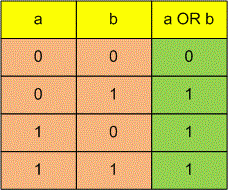
In many fields, the task of combining images often arises. One of the simplest methods used when working with black-and-white images is the per-pixel application of a logical operation. This means that the value of the resulting pixel is obtained by applying this logical operation to the corresponding pixels of the arguments. A logical operation on two arguments is usually given by a truth table, which contains the result for all possible combinations of arguments. For example, for the operation "OR", the table looks as follows:
Write a program that finds the result of applying a given logical operation, pixel by pixel, to two black-and-white images of the same size.
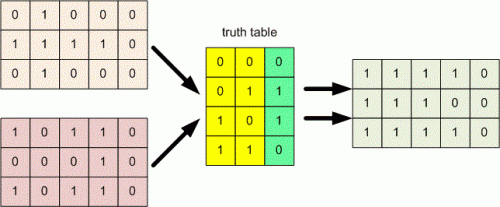
The first line contains two integers and (1 \leq w, h \leq 100). The next lines describe the first image, with each line consisting of characters, each of which is or . The next lines describe the second image in the same format. The last line contains a description of the logical operation in the form of four numbers, each of which is or . The first number is the result of the logical operation if both arguments are , the second if the first argument is and the second is , the third if the first argument is and the second is , and the fourth if both arguments are .
Output the result of applying the specified logical operation to the images in the same format as the images given in the input.
Example 1