
Strings
A string stores text as a row of characters numbered from 0; in C++ it is std::string. To find a pattern in a text of millions of characters, see the prefix function.
Use a string whenever the input is a word, a line or a row of characters, such as a row of a maze, and for a number with hundreds of digits, which doesn't fit in long long. A vector<char> stores characters the same way, but a string is read and printed in one call and has the operations for text: joining, cutting, searching, comparing.
How it works
Like in a vector, s[i] is the character at index i, and s.size() is the number of characters, the length of the string (s.length() is the same); both take time. A substring is a row of consecutive characters inside the string: s.substr(pos, len) is the substring of len characters that starts at index pos, and s.substr(pos), with no length, runs to the end. On s = "abracadabra", s[4] is c and s.substr(4, 3) is "cad":
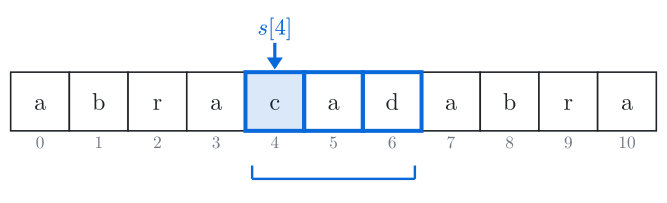
Fig. 1. Indices start at 0; a substring is given by its start and its length.
Characters are numbers
A character is stored as a small number, its code. The codes come from the ASCII table; these are the ones you need most:
Characters | Codes | Example |
|---|---|---|
space | 32 |
|
digits | 48–57 |
|
| 65–90 |
|
| 97–122 |
|
Digits and letters have consecutive codes, and that turns characters into numbers and back. A digit c has the value c - '0'. A lowercase letter c is letter number c - 'a' of the alphabet, from 0 for a to 25 for z. Counting the same number from 'A' gives the uppercase letter, so c - 'a' + 'A' turns c into uppercase. c >= 'a' && c <= 'z' tests whether c is a lowercase letter.
Arithmetic on a char gives an int, and cout prints an int as a number: cout << 'a' + 1 prints 98, so write char('a' + 1) to get b. The library functions isdigit(c), isalpha(c) and toupper(c) (header <cctype>) do the same tests and conversion; toupper also returns an int, so print char(toupper(c)).
Comparing strings
s < t compares characters from index 0 until they differ, and the string with the smaller code there is smaller; if one string runs out first, it is smaller. For lowercase words this is dictionary order. With other characters the codes decide, so "Zoo" < "apple" (uppercase codes are smaller) and "10" < "9" ('1' comes before '9').
Searching with find
s.find(t) looks for the pattern t in the text s. It places the pattern under the text at index 0 and compares characters one by one. At the first mismatch the pattern moves one step right and the comparing starts again; when every character matches, find returns the start index. The real library may skip ahead faster, but the worst case is the same. Let's watch it look for "aca" in "abracadabra".
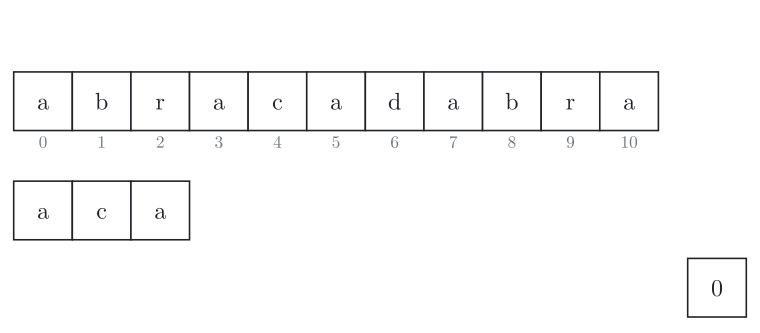
The pattern "aca" starts under index 0 of the text; nothing is compared yet. The number at the bottom right counts the comparisons.
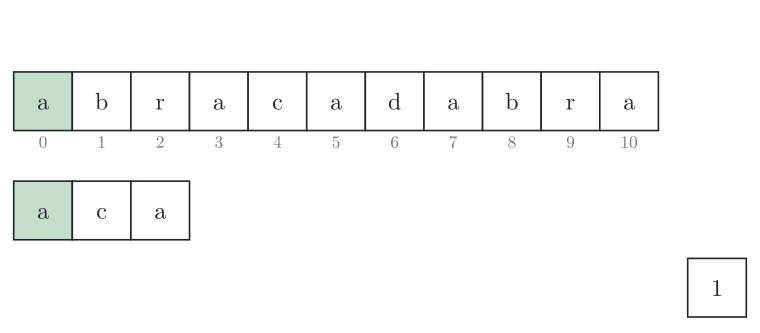
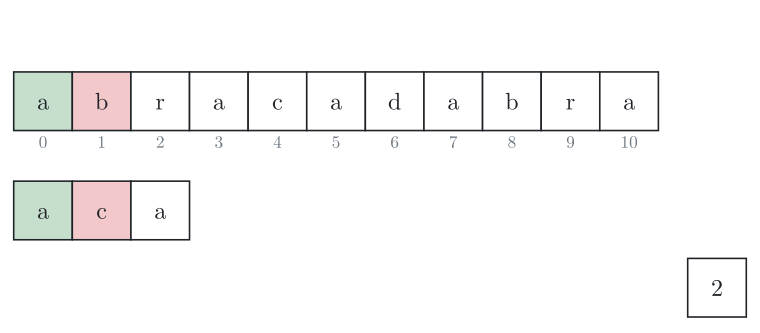
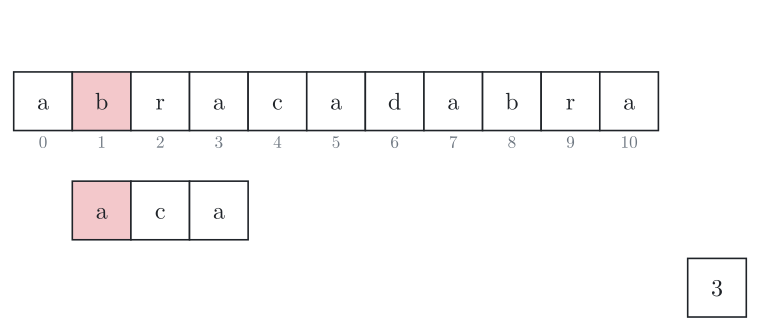
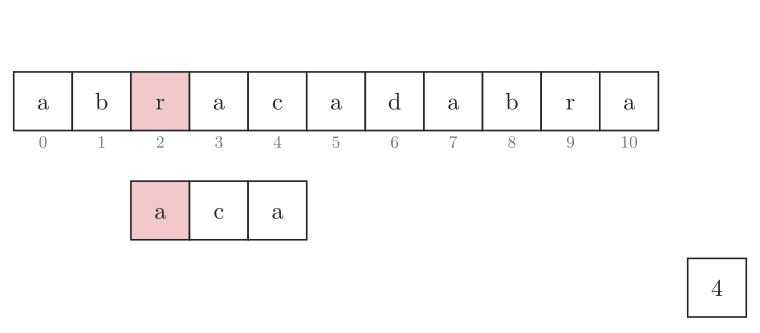
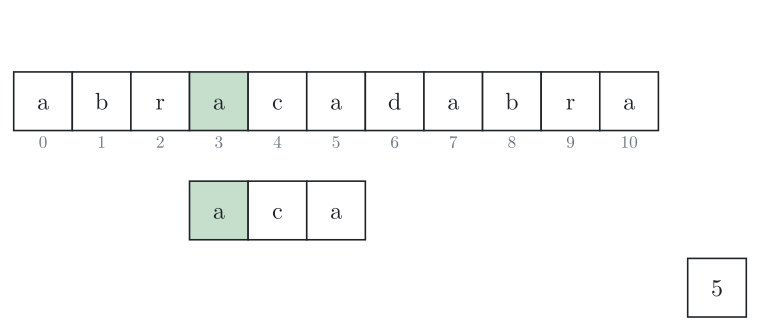
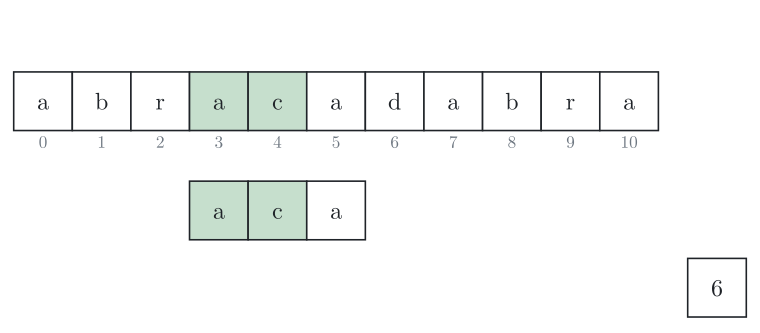
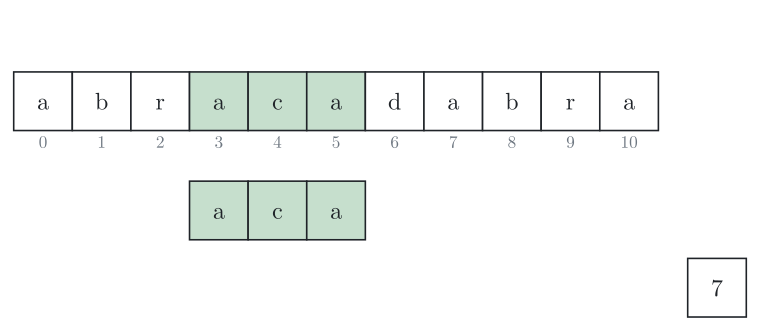
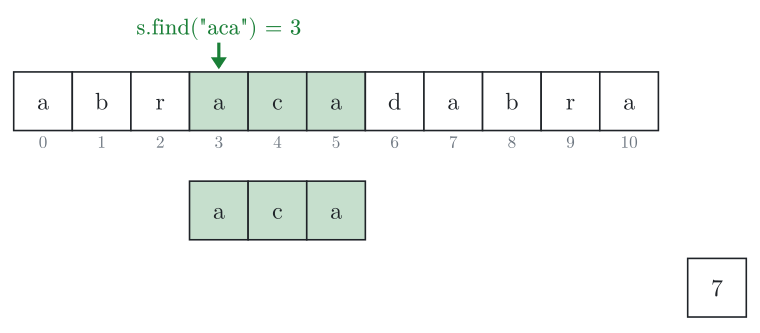
Fig. 2. Step through with the buttons or the arrow keys. Green characters match, a red one is the first mismatch; then the pattern moves one step right.
In the worst case almost the whole pattern matches at every start index, as when looking for "aaab" in "aaaaaaaa". Then the search makes about n \cdot m comparisons, where is the length of the text and the length of the pattern: fine for lines of a few thousand characters, too slow for a text of 10^6 characters and a long pattern.
When the pattern isn't there, find returns string::npos. Test the result with != string::npos. npos is the largest value of size_t, the unsigned integer type that size() and find return.
The cost of each operation
Here is the length of s and the length of t.
Operation | What it does | Time |
|---|---|---|
| the character at index | |
| the number of characters | |
| appends at the end | ; on average for one character |
| a new string, | O(n + m) |
| a copy of | |
| the first index where | up to O(n \cdot m) |
| the last index where | up to O(n \cdot m) |
| inserts or removes in the middle | : later characters move |
| compare |
In C++
The string is in the header <string>, and string s = "abracadabra"; makes a string from a text in quotes.
cin >> s reads one word: it skips spaces, then stops at the next space or line break. getline(cin, s) reads the whole line, spaces included.
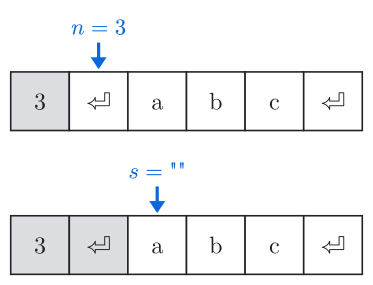
Fig. 3. Input 3⏎abc⏎: where reading stops after cin >> n and after getline.
An index where the pattern starts is an occurrence. The program below reads a text and a pattern, each a line of at most 1000 characters, spaces allowed. It prints the length of the text, then all occurrences on one line, or an empty line if there are none. For example, the input can be:
abracadabra
abra
#include <iostream>
#include <string>
using namespace std;
int main() {
string s, t;
getline(cin, s); // read the text, spaces included
getline(cin, t); // read the pattern
cout << s.size() << "\n"; // the length of the text
size_t pos = s.find(t); // the first occurrence
while (pos != string::npos) { // npos means "not found"
cout << pos << " ";
pos = s.find(t, pos + 1); // the next occurrence; pos + t.size() skips overlapping ones
}
cout << "\n";
}The search restarts at pos + 1, so it also finds occurrences that overlap: in "aaa" the pattern "aa" starts at 0 and at 1 (with pos + t.size(), only 0 is printed). The program uses O(n + m) memory.
Joining and cutting
s + t joins two strings, and s += t or s += c appends to s. A text in quotes is a plain array of characters, not a string, so "cat" + "dog" doesn't compile; write "cat" + string("dog").
Visiting every character
A loop for (char c : s) visits every character of s in order, like for (int i = 0; i < s.size(); i++) with c = s[i]. With char &c, this one makes every lowercase letter uppercase, so "Cat 42" becomes "CAT 42":
for (char &c : s) {
    if (c >= 'a' && c <= 'z') c = c - 'a' + 'A';
}
The & makes c the character inside s; without it, c is a copy, and s stays the same.
long long holds at most 19 digits (up to about 9 \cdot 10^{18}), so read a longer number as a string and visit it digit by digit. This loop gives the digit sum, 16 for "907":
int sum = 0;
for (char c : s) sum += c - '0';
Examples of use
To count each letter of a text, keep an array of 26 counters and add 1 to
cnt[c - 'a']for each character, as in counting sort.A palindrome check moves from both ends to the middle with two pointers, or compares the string with a copy reversed by
reverse(s.begin(), s.end())from<algorithm>.Sorting works on strings as on vectors:
sort(s.begin(), s.end())puts the characters ofsin order, andsorton a vector of strings uses<.Bracket matching keeps the open brackets on a stack; a string used only at its end, through
push_back,backandpop_back, can be that stack.For texts too long for
find, the prefix function, the Z-function and string hashing find every occurrence in O(n + m).
Common mistakes
Reading a line with
cin >> s. On the lineabba catit reads only"abba", so a palindrome check says yes for a line that isn't one. Read lines withgetline(cin, s).Reading
substr's second argument as an end index:s.substr(4, 6)on"abracadabra"gives"cadabr", not indices 4 to 6. When a problem numbers characters from 1, the start is also one less.Using the result of
findas true or false.s.find("abr")is 0 on"abracadabra", soif (s.find("abr"))skips a pattern that is there. Writeif (s.find(t) != string::npos).Adding digit characters instead of their values. The characters of
"907"add up to 57 + 48 + 55 = 160; addc - '0'.Comparing numbers stored as strings with
<. Without leading zeros, compare the lengths first:a.size() < b.size() || (a.size() == b.size() && a < b).
Similar structures
A map with string keys, map<string, int>, counts how often each word occurs, and finds a word among words in O(\log k) comparisons instead of for a list of strings.
Practice
Very easy · Strings
Very easy · Strings
Very easy · Strings
Very easy · Strings
Very easy · Strings
Very easy · Strings
Very easy · Strings
Easy · Implementation · Strings
Very easy · Strings