
Flood fill
Flood fill paints every cell of a grid that can be reached from a given cell through side neighbours of the same colour. If you need the fewest moves between two cells, use BFS instead.
Explanation
A drawing program has a paint bucket: click a cell of a picture, and the cell turns blue together with the touching cells of its colour. The picture is a grid of cells, and a cell is written as (row, column), counted from 0, with row 0 at the top.
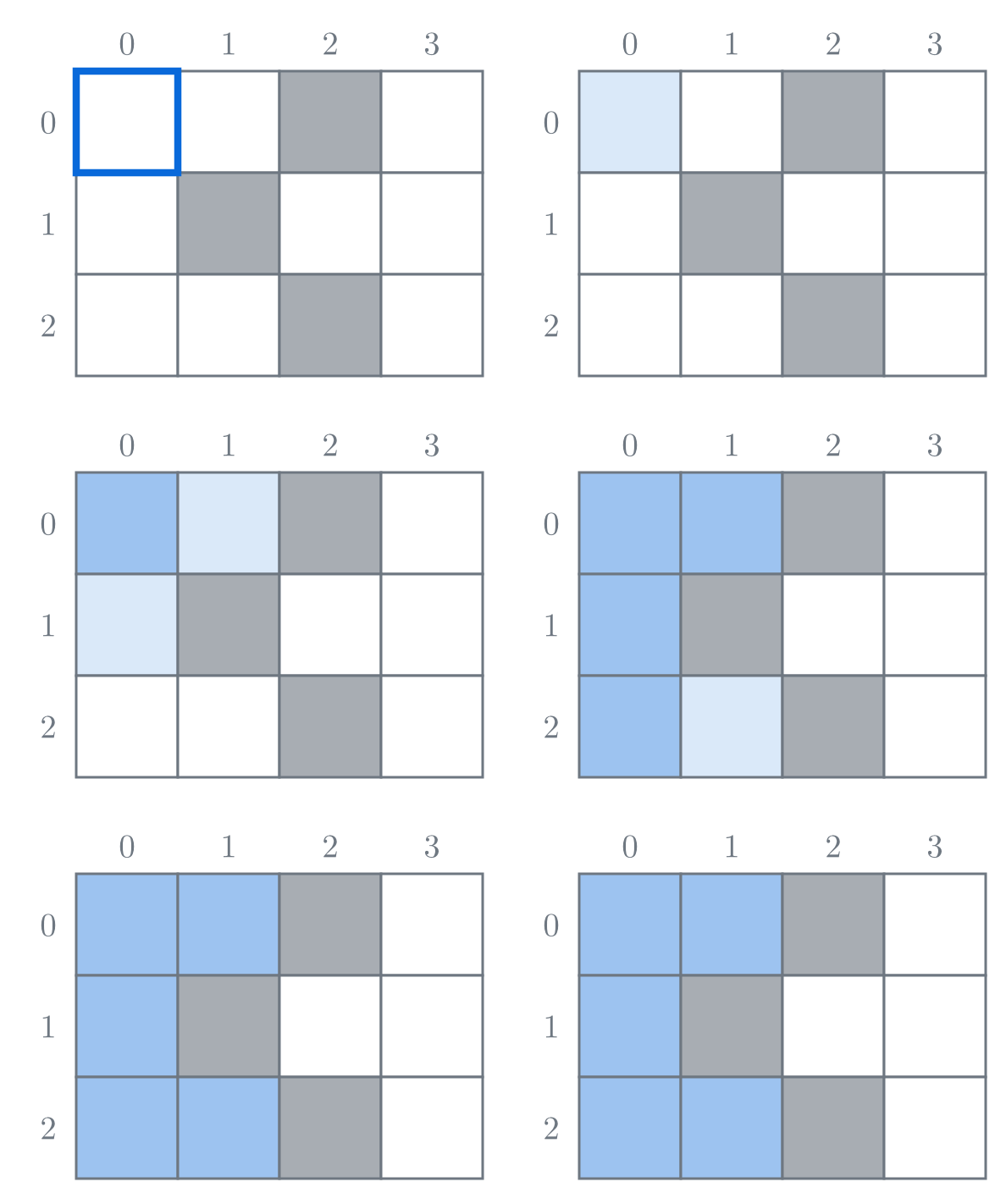
Fig. 1. Clicking (0, 0) paints the touching white cells.
The 4 white cells on the right stay white: every path to them crosses a black cell. The cells of one colour that you can reach from a cell by stepping to side neighbours of that colour form its region.
The grid is a graph: the cells are its vertices, and side neighbours of the same colour are joined by edges. The edges are never stored; a program finds them by looking at the four cells around a cell. A painted cell is a visited cell, so the fill is a depth-first search on this graph. With recursion it takes a few lines: paint the cell, then fill from each of its four neighbours that still has the old colour.
On a big grid this crashes. A call stays on the call stack until every call it makes has returned. Fill an all-white 4 × 4 grid from (0, 0), trying neighbours up, down, left, right. The calls go down the first column, up the second, down the third and up the fourth, and no call returns before the last cell is painted.
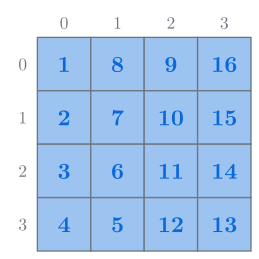
Fig. 2. No call returns until the last cell is painted: 16 cells, 16 calls waiting at once.
That is one waiting call per cell. On an all-white 1000 × 1000 grid it is 1,000,000 calls, far more than the memory set aside for calls can hold, and the program crashes.
The waiting calls only remember which painted cells still have neighbours to look at. A program can keep that list itself, in ordinary memory, where a million cells fit:
Initialise: paint the start cell and add it to the list.
Take the next cell from the list.
Paint and add its neighbours: each side neighbour that still has the old colour is painted and added to the list.
Stop when the list is empty.
A cell joins the list only when it is painted, and a painted cell is never painted again. So each cell is taken once, with 4 checks: about 4 \cdot R \cdot C checks for rows and columns.
The list can hand out its cells in any order: every taken cell paints its neighbours of the old colour, so each cell of the region is painted sooner or later. Taking the newest cell first makes the list a stack, like the call stack. Taking the oldest first makes it a queue (first in, first out) and the fill a breadth-first search. Only the order of painting changes. From here on the list is a stack.
Fig. 3 runs the fill with a stack on a 5 × 6 grid, checking neighbours up, down, left, right.
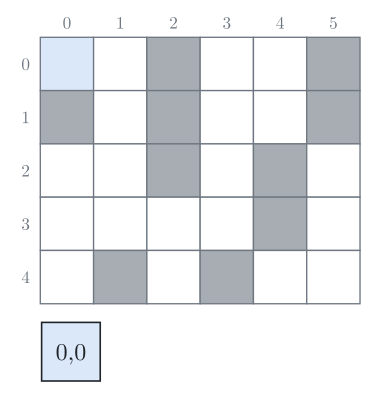
Initialise: paint (0, 0) and push it. The stack is shown under the grid, its top on the right.
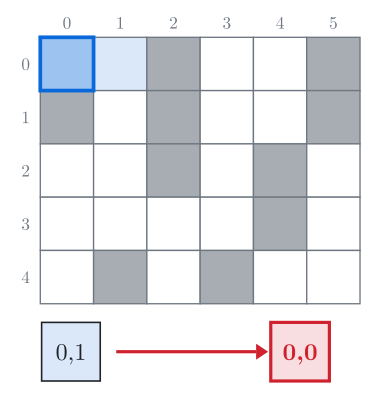
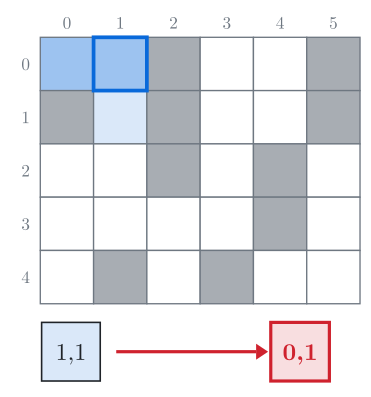
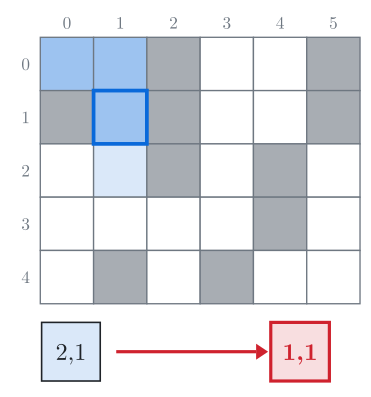
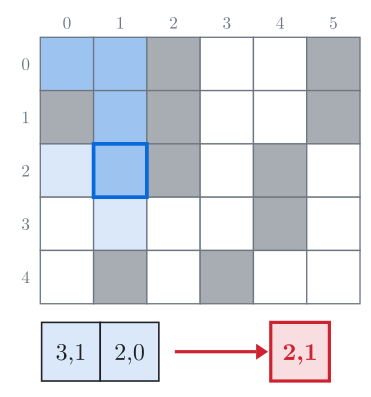
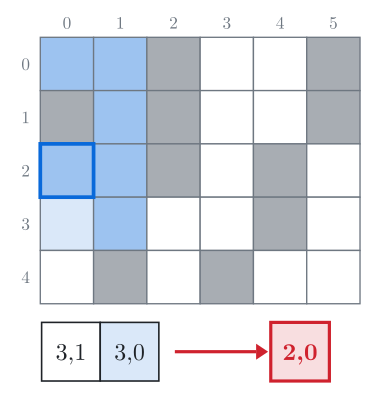
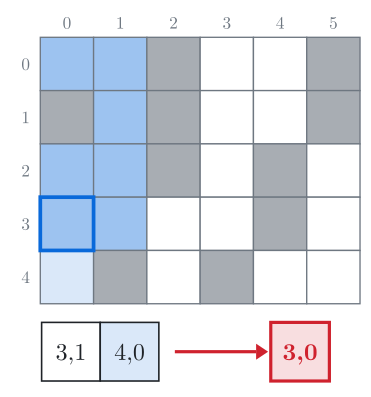
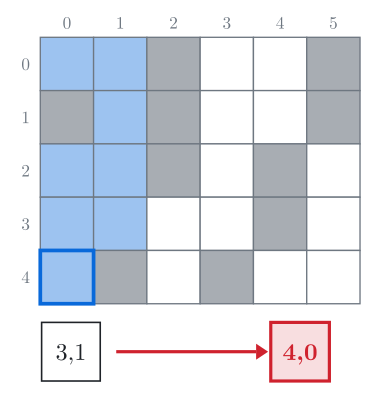
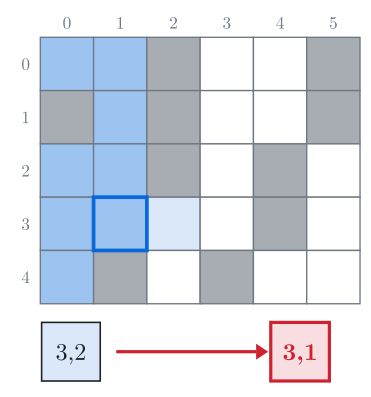
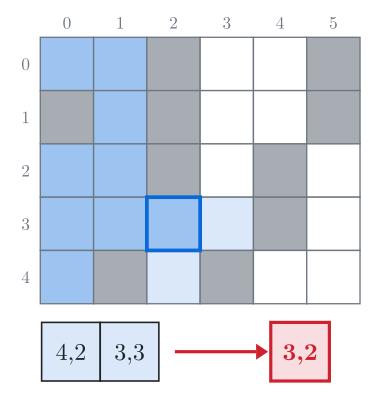
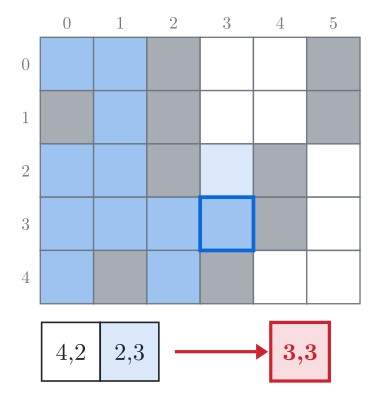
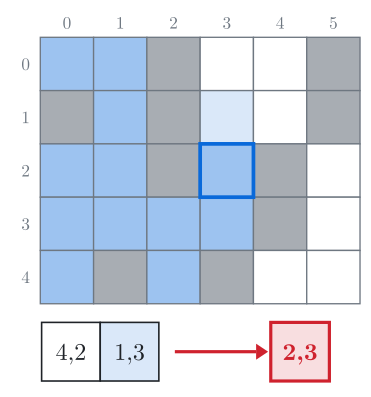
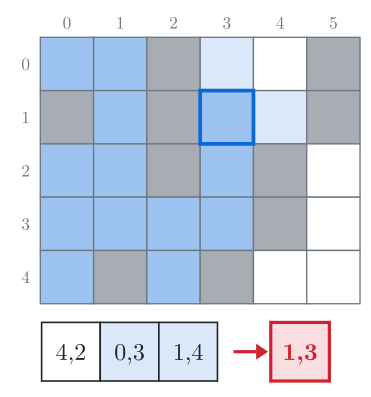
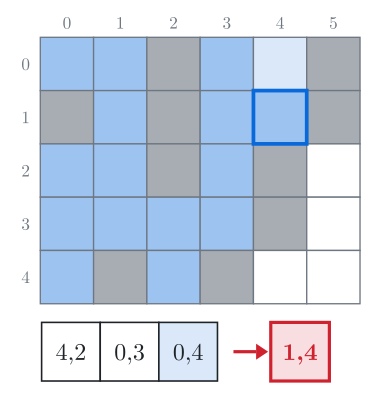
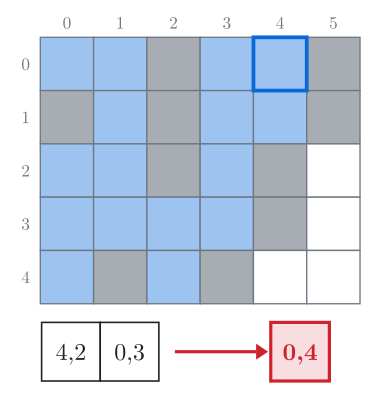
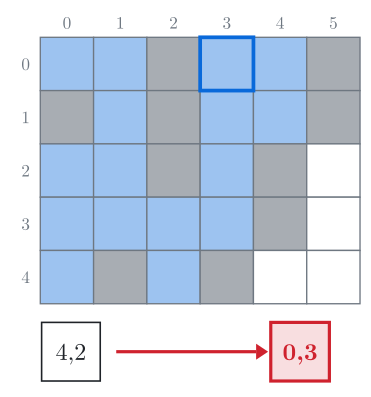
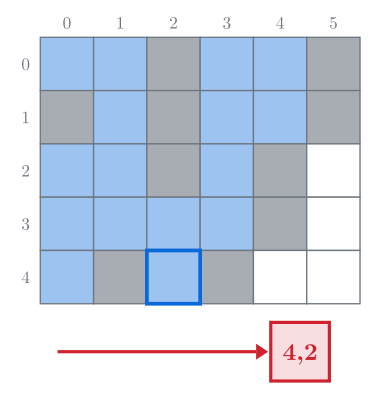
Fig. 3. Step through the fill with the buttons or the arrow keys. The outlined cell is taken from the top of the stack, shown under the grid; light blue cells were just painted and pushed.
The run painted the 16 cells of the region of (0, 0), and the stack never held more than 3 cells.
Reach for a fill when a grid problem asks which cells are joined, how many regions there are, how big a region is, or what is enclosed: islands, rooms, blots, lakes.
In C++
The grid is a vector<string> g, one string per row, . for white and # for black. fill(g, sr, sc, to) paints the region of cell (sr, sc) with the character to and returns its size; the old colour is from = g[sr][sc]. A cell is painted when it is pushed, so the check g[nr][nc] != from skips every painted cell, and no separate visited array is needed. Taking the next cell is top() followed by pop().
The program reads R and C, R rows of . and #, and the start cell, and prints the region's size and the painted grid. For Fig. 3 the input is:
5 6
..#..#
#.#..#
..#.#.
....#.
.#.#..
0 0#include <iostream>
#include <stack>
#include <string>
#include <vector>
using namespace std;
int dr[] = {-1, 1, 0, 0, -1, -1, 1, 1}; // up, down, left, right, then the 4 corners
int dc[] = {0, 0, -1, 1, -1, 1, -1, 1};
const int MOVES = 4; // use all 8 moves if cells touching at a corner are neighbours
// Paints the region of cell (sr, sc) with colour `to` and returns its size.
int fill(vector<string>& g, int sr, int sc, char to) {
int R = g.size(), C = g[0].size();
char from = g[sr][sc];
if (from == to) return 0; // already that colour: without this line the loop never ends
// initialise
stack<pair<int, int>> todo;
g[sr][sc] = to;
todo.push({sr, sc});
int size = 1;
while (!todo.empty()) { // stop when the stack is empty
// take the next cell
int r = todo.top().first, c = todo.top().second;
todo.pop();
// paint and push its neighbours
for (int k = 0; k < MOVES; k++) {
int nr = r + dr[k], nc = c + dc[k];
if (nr < 0 || nr >= R || nc < 0 || nc >= C) continue; // outside the grid
if (g[nr][nc] != from) continue; // another colour, or painted
g[nr][nc] = to;
todo.push({nr, nc});
size++;
}
}
return size;
}
int main() {
int R, C;
cin >> R >> C;
vector<string> g(R);
for (auto& row : g) cin >> row;
int sr, sc;
cin >> sr >> sc;
cout << fill(g, sr, sc, '+') << "\n";
for (auto& row : g) cout << row << "\n"; // remove this line if you only need the size
}Each cell is taken once, so the fill takes O(R \cdot C) time: about 4 \cdot 10^6 checks on a 1000 × 1000 grid, or twice that with 8 moves. The stack holds at most R \cdot C cells, so the memory is O(R \cdot C) too. On an all-white 1000 × 1000 grid it peaks at 499,501 cells, about half the grid, which is 4 MB.
The recursive version, for comparison:
void fill(vector<string>& g, int r, int c, char from, char to) {
    if (r < 0 || r >= (int)g.size() || c < 0 || c >= (int)g[0].size()) return;
    if (g[r][c] != from) return;
    g[r][c] = to;
    for (int k = 0; k < 4; k++) fill(g, r + dr[k], c + dc[k], from, to);
}Counting regions and their sizes
To find every region, start a fill at each cell that still has the colour you count. The fill paints its whole region, so no region is started twice.
vector<int> sizes;   // one entry per white region
for (int r = 0; r < R; r++)
    for (int c = 0; c < C; c++)
        if (g[r][c] == '.') sizes.push_back(fill(g, r, c, '+'));
In the grid of Fig. 3 this finds white regions of 16 and 4 cells. Each cell is painted once over all fills, so the loop is still O(R \cdot C).
Filling from the border
Water (.) is enclosed by land (#) if no path of water leads from it to the border. Start a fill from every water cell on the border. The water these fills leave unpainted is enclosed.
for (int r = 0; r < R; r++)
    for (int c = 0; c < C; c++)
        if ((r == 0 || r == R - 1 || c == 0 || c == C - 1) && g[r][c] == '.')
            fill(g, r, c, '+');
In the grid below, cell (2, 4) looks enclosed, but a path of water joins it to the border.
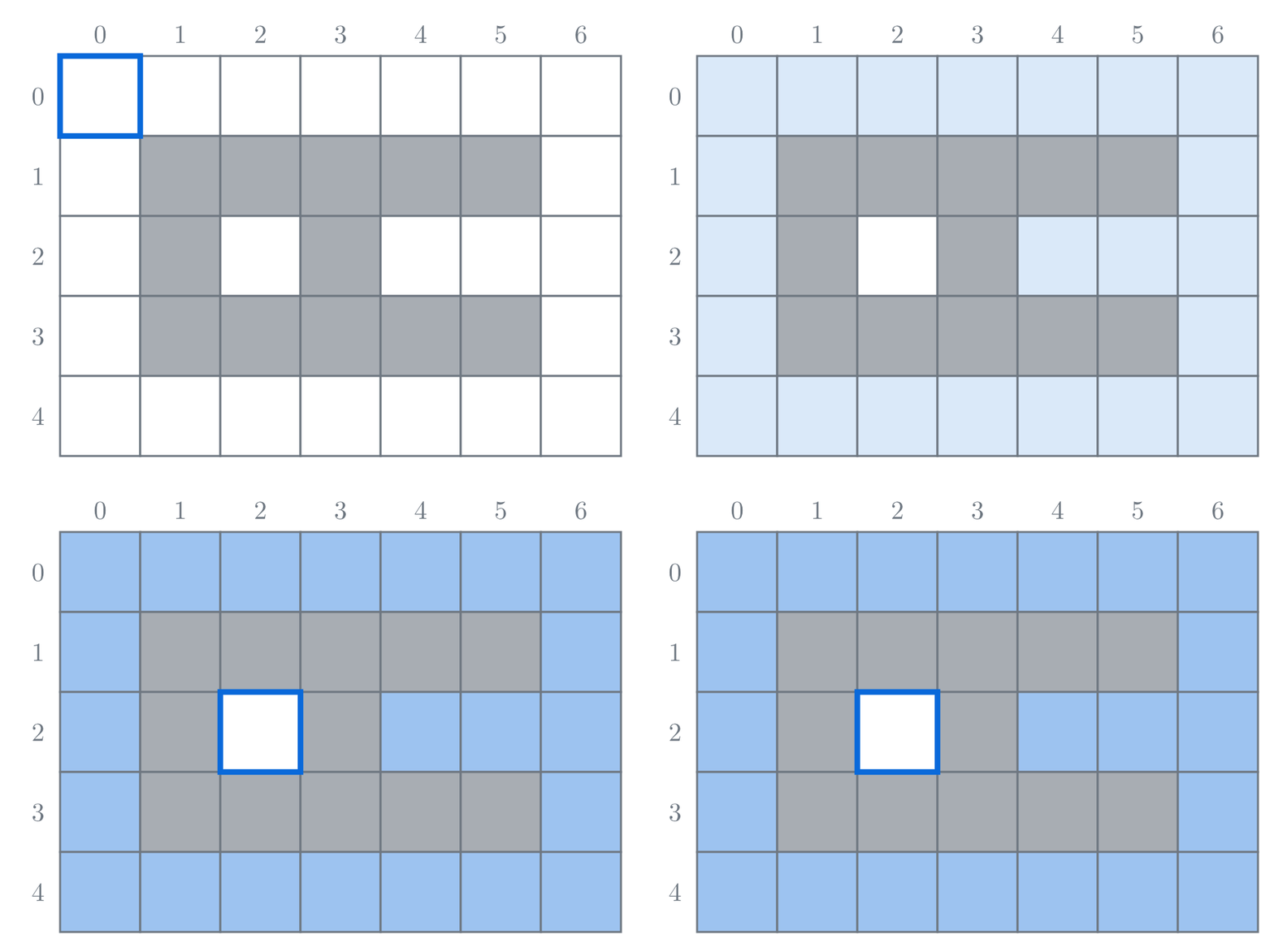
Fig. 4. The fill from (0, 0) reaches (2, 4). The other border cells are already painted, so no other fill starts. Only (2, 2) is enclosed.
Common mistakes
The wrong neighbours. In some problems cells touching at a corner are neighbours: the black diagonal
#..,.#.,..#is 3 black regions with 4 moves and 1 with 8. Read the statement and setMOVESto match.
Similar techniques
Breadth-first search reaches cells in order of distance, so it gives the fewest moves to a cell.
Connected components: the loop that starts a search at every vertex not reached yet, on any graph. Counting regions in a grid is that loop with flood fill inside.
Multi-source BFS: a spread from many cells that also says when each cell is reached (fire, the nearest exit); the border fill needs only which cells.
Disjoint set union: when cells change colour one at a time and the number of regions is asked after each change; filling again every time is too slow.
Practice
Дуже легка · Графи
Дуже легка · Графи
Легка · Графи · Імплементація
Дуже легка · Графи
Легка · Графи
Дуже легка · Графи
Легка · Графи