
Variables, input and output
A variable is a named place in memory that holds one value of a fixed type, such as an integer or a piece of text. A program reads the input into variables with cin, computes the answer and prints it with cout. Every solution on a judge has this shape.
Explanation
A program reads two numbers and prints their sum: on the input 3 5 the judge expects the output 8.
int a, b;
cin >> a >> b;     // Read
cout << a + b;     // Compute and Print
int a, b; creates two variables, a and b, that hold integers. cin >> a >> b; fills them from the input, and cout prints the sum. These lines go inside main of the template below, in place of its marked lines, and the judge runs them from top to bottom.
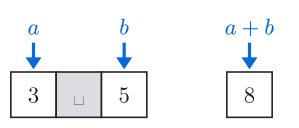
Fig. 1. The space between the numbers is skipped.
The sign = doesn't mean "is equal": it puts the value on its right into the variable on its left. After a = a + 1; the variable a holds 3 + 1 = 4, and the old 3 is gone. After b = a; the variable b holds a copy of the value a has at that moment. A variable can also get its first value where it is created: int a = 5;.
Types and operators
The type of a variable decides what it can hold. Five types cover most problems:
Type | Holds | Example | Limit |
|---|---|---|---|
| an integer |
| from about -2 \cdot 10^9 to 2 \cdot 10^9 |
| an integer |
| about \pm 9 \cdot 10^{18}; see integer types |
| a number with a fractional part |
| about 15 significant digits; see floating-point numbers |
| one character, in single quotes |
| stored as its code, a number ( |
| text, in double quotes |
| any length; see strings |
The operators +, -, *, / and % add, subtract, multiply, divide and give the remainder. Between two integers / drops the fractional part, so 7 / 2 is 3 and 7 % 2 is 1, while 7.0 / 2 is 3.5 (more in integer division). Arithmetic on a char works on its code and gives an int. Letters have consecutive codes, so 'A' + 1 is 66.
How >> reads the input
A shop prints a receipt with a customer's name and the total. The input has the name and how many items they bought, Bob 3, on one line and the price of one item, 2.5, on the next.
string name;
int count;
double price;
cin >> name >> count >> price;
double total = count * price;
cout << name << ' ' << total << '\n';
'\n' is the line-break character, so the receipt ends with a new line. The input reaches the program as one row of characters, with a space and two line breaks among them.
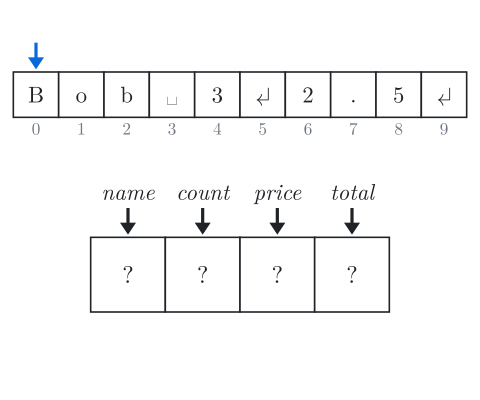
Read: no variable has a value yet, and the blue arrow marks where the next read starts, at cell 0.
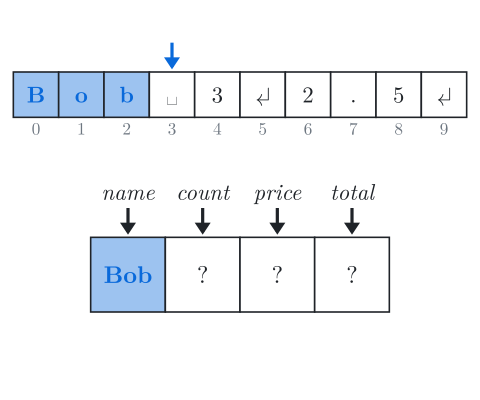
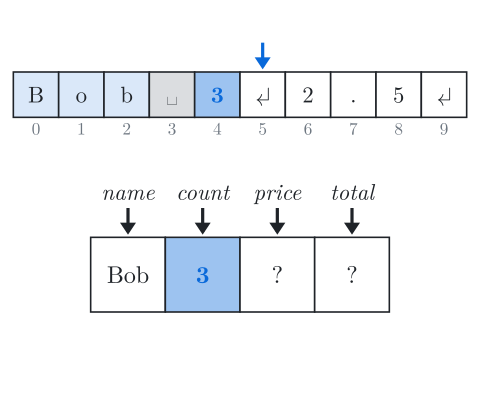
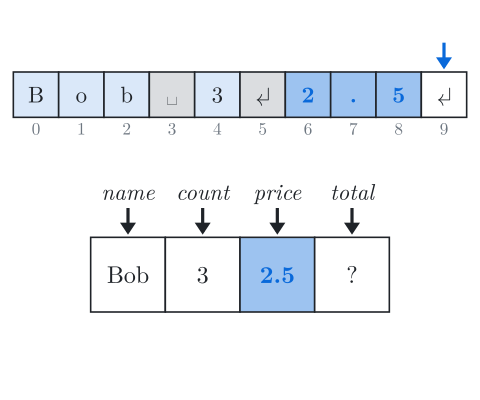
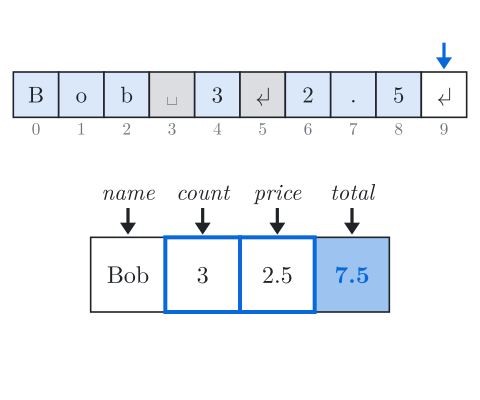
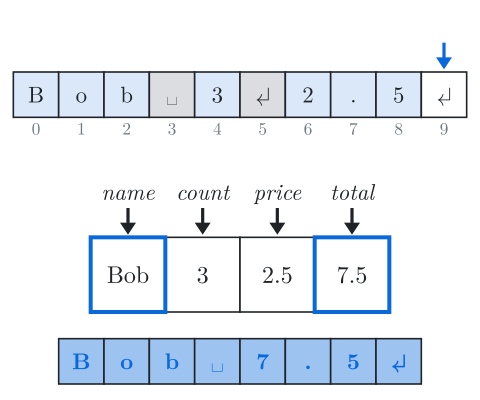
Fig. 2. Step through the program with the buttons or the arrow keys. Grey cells are skipped, highlighted cells go into the box below.
Each >> skips spaces and line breaks, then takes the characters that can be part of a value of the variable's type, and stops at the first one that can't. So the line break between 3 and 2.5 made no difference: the same code reads the same values from Bob 3 2.5 on one line.
Print only the values the problem statement asks for, in its order and with its separators, because the judge compares the output with the correct answer character by character.
A line with spaces
The next customer is Mary Ann, so the input is Mary Ann on one line and 3 2.5 on the next.
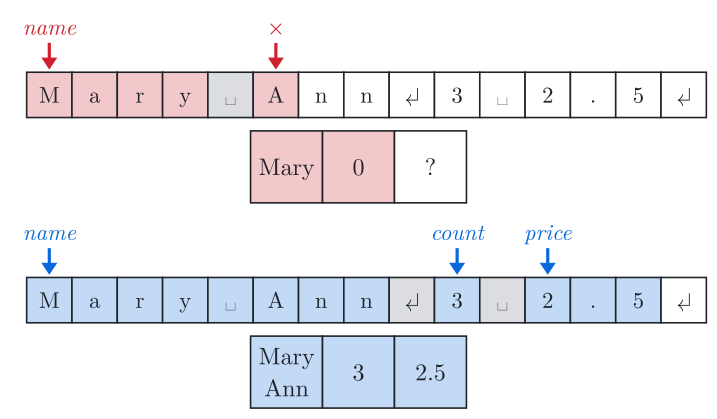
Fig. 3. Red, on top: the same code as before. Blue, below: the name is read with getline.
With the red code, name gets only Mary, because reading a string with >> stops at a space. Ann can't start an integer, so the read of count fails, count becomes 0, and every later read does nothing. The blue code starts with getline(cin, name), which takes the whole line up to the line break. Use getline when a value may contain spaces, and >> for everything else.
In C++
Every solution can start from this template:
#include <bits/stdc++.h>
using namespace std;

int main() {
    ios::sync_with_stdio(false);  // fast input and output
    cin.tie(nullptr);

    long long a, b;               // Read
    cin >> a >> b;

    long long sum = a + b;        // Compute

    cout << sum << '\n';          // Print
}The template uses long long because two int values near 2 \cdot 10^9 add up to more than an int holds. #include <bits/stdc++.h> includes the whole standard library at once, and using namespace std; lets you write cin and string instead of std::cin and std::string.
getline after >>
After a cin >>, the line break that ended the number is still waiting in the input, so a plain getline reads the empty rest of that line. Writing cin >> ws inside getline skips the line break first:
int n;
string city;
cin >> n;
getline(cin >> ws, city);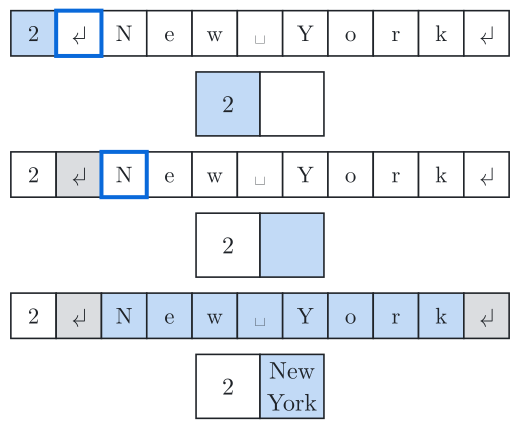
Fig. 4. Compare panels 2 and 3: only the start of getline differs.
A fixed number of digits
cout prints a double with at most 6 significant digits and drops trailing zeros: 3 * 2.4 prints 7.2, and 1234567.0 prints 1.23457e+06. When a statement asks for a number of digits after the point, set it with fixed and setprecision, which then apply to every later double printed:
double x = 3 * 2.4;
cout << fixed << setprecision(2) << x << '\n';   // prints 7.20
Reading until the input ends
Some inputs don't say how many values follow. cin >> a >> b becomes false when nothing is left to read, so a loop can read pairs until the end:
long long a, b;
while (cin >> a >> b) {
    cout << a + b << '\n';
}
The same loop with string s; and while (cin >> s) reads the input word by word.
Fast input and output
The fast-I/O lines at the top of main make reading and printing about ten times faster. ios::sync_with_stdio(false) stops cin and cout from keeping step with C's scanf and printf. cin.tie(nullptr) stops cin from flushing cout, that is, sending out everything printed so far, before every read. endl also flushes; '\n' doesn't. With GCC on Linux, a program that reads 10^6 numbers and prints 10^6 lines took 0.47 s without these lines, 0.04 s with them and '\n', and 0.38 s with them and endl.
Common mistakes
Printing a prompt or a label. On the input
3 5, the outputEnter two numbers: 8gets Wrong Answer although 8 is in it, so print only the answer.A value is too big for
int. Reading3000000000into anintstores 2147483647 and makes every later read fail; read it into along long.Printing a
doublewithoutfixed. When the statement asks for two digits after the point,3 * 2.4printed as7.2gets Wrong Answer against7.20; usefixed << setprecision(2).
Similar techniques
Integer types: how a product of two
intvalues overflows.Floating-point numbers: how to compare two
doublevalues.Arrays and vectors: keeping the values you read to use them later.
Practice
Very easy · Implementation · For Beginners
Very easy · Implementation
Very easy · Implementation
Very easy · For Beginners
Very easy · For Beginners
Very easy · For Beginners
Very easy · Strings
Very easy · Implementation